Multiple Pulsar services in one node
The Pulsar Endpoint can be enabled to accept jobs from multiple Galaxy servers through RabbitMQ queues. Credentials request and configurations procedures are detailed in Get RabbitMQ credentials although few adjustments are necessary. The message queue, systemd service of the single deployment are referred as “main” from now on to avoid confusion. The procedure remains unchanged for the main Pulsar service. However, for each additional Pulsar service, a Pull Request must be submitted to the corresponding Galaxy infrastructure repository, following the same provided instructions.
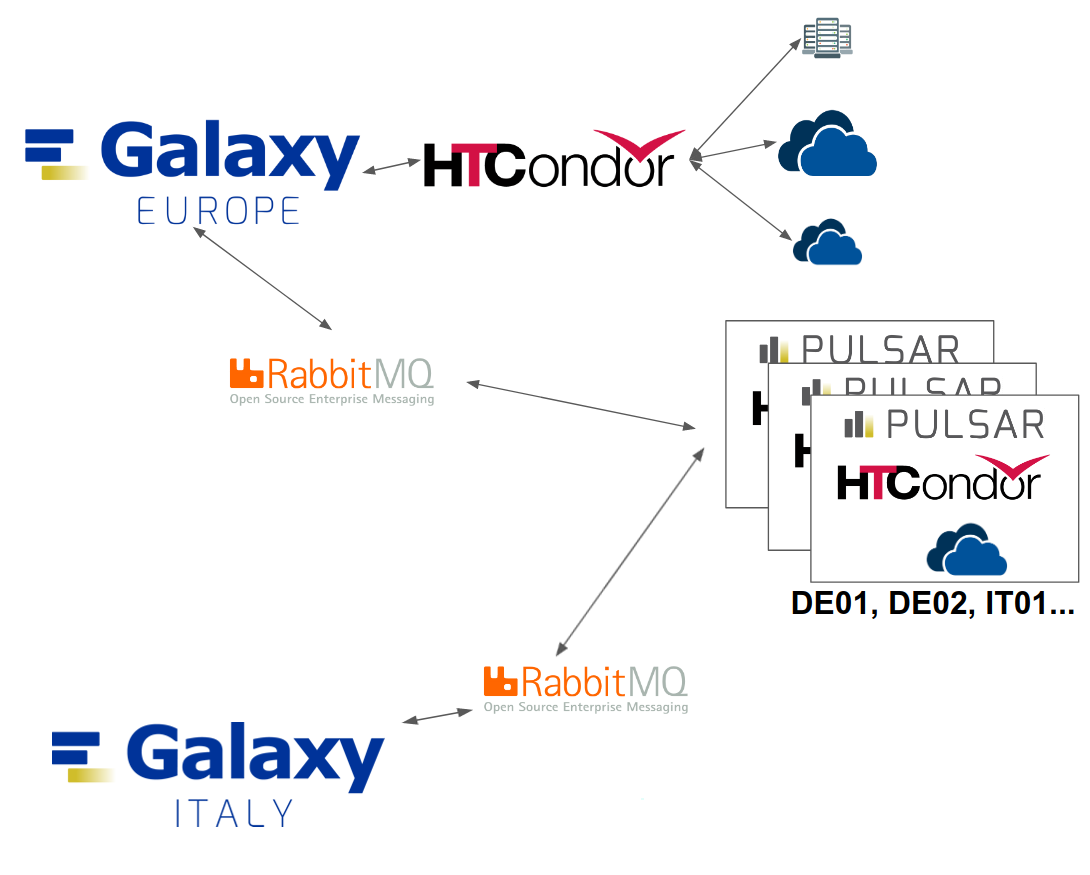
By default the deployment will enable only the main service unless extra_mq_urls ( found in pulsar-deployment/tf/vars.tf ) is properly defined.
Note
Already deployed a Pulsar endpoint? See Setting up extra Pulsar services after deployment
TPV Configuration
Note
Usegalaxy files, updated through pull request, files/galaxy/config/user_preferences_extra_conf.yml, group_vars/mq.yml, templates/galaxy/config/job_conf.yml for the additional pulsar services can be updated as usual, entering the correct values based on the Pulsar endpoint, the RabbitMQ credentials and virtual host.
The additional job directories cannot be the defaults, since those are used by the main pulsar service. Therefore the TPV configuration described here has to be adjusted to include the supplementary directories under params.
Below is an example of an extra pulsar service destination, to highlight the differences a diff was used against the main configuration:
vim files/galaxy/tpv/destinations.yml.j2pulsar_test01_tpv: max_accepted_mem: 30 min_accepted_gpus: 0 max_accepted_gpus: 0 + params: + jobs_directory: "/data/share/test01/staging" + persistence_directory: "/data/share/test01/persisted_data" scheduling: require: - test01-pulsar
Single Command Deployment
The deployment of multiple pulsar services in one node can be done through the single command line terraform apply as described thoroughly in Building the Pulsar endpoint. The only difference is the addition of a single variable of type map to the command.
After having edited accordingly the the Terraform files (see: Configure the pulsar endpoint and Building the Pulsar endpoint) execute the following command:
terraform init

terraform plan

terraform apply -var "pvt_key=~/.ssh/<key>" -var "condor_pass=<condor-passord>" -var "mq_string=pyamqp://<pulsar>:<password>@mq.galaxyproject.eu:5671//pulsar/<pulsar>?ssl=1" -var 'extra_mq_urls={test01="pyamqp_url01", test02="pyamqp_url02"}'
Warning
In the provided command, single quotes (') are used for the last argument (extra_mq_urls) to avoid parsing errors caused by double quotes (") inside the variable value.
Ensure proper escaping of quotes when using complex strings with nested quotes to prevent unexpected behavior or syntax errors during execution.
Multiple Pulsar services deployment variables details
Note
The addition of extra pulsar services requires only extra_mq_urls when using the recommended defaults and following this guide.
Terraform variables
extra_mq_urls
- Description:
Additional message queues are defined as a key-value map. Keys define systemd unit and directory names, while values specify the corresponding message queue URLs.
- Validation Rules:
Values must not include
mq_string.All values in the map must be unique.
If no
extra_mq_urlsare provided (the variable is left with the default value), no additional pulsar services are enabled.- Example:
- Reminder:
Duplicated keys will overwrite older key-value pairs silently. Ensure all keys are unique to avoid unexpected behavior, duplicated message queues are not allowed by the validation rules.
norm_ex_mqs
- Description:
This local variable must be left untouched: it manages the logic of
extra_mq_urlswhich will be wrapped in the appropriate Ansible dictionary name (ex_mqs_dict) when valid values are defined. Ifextra_mq_urlshas its default values,jsonencode(local.norm_ex_mqs)will pass to the Ansible playbook an empty dictionary, giving the possibility to defineex_mqs_dictelsewhere ( i.e. Ansible Vault ) without the risk of overwriting the value.
Ansible variables
ex_mqs_dict
- Description:
Dictionary containing the key-value pairs of additional RabbitMQ queues. Keys define systemd unit and directory names. It is passed to the Ansible playbook during Terraform execution.
- Example:
Warning
Even when not passed through Terraform, the variable will be subjected to the same validation rules as extra_mq_urls to avoid conflicts between services and unexpected behaviors. To disable it, when launching manually the playbooks main.yml or post_deploy_pulsar_services.yml, set tf_var_check to true.
Note
The default paths are defined in pulsar-deployment/tf/ansible/main.yml along with Ansible Pulsar Role variables, with the same values used during the VGCN image build. Those variables can be left unchanged.
The central manager is still configured with Ansible at deployment time. The following table provides a summary of the directory paths and variables for reference and clarity.
Variable |
Default Value |
Shared by Pulsar Services |
Details |
|---|---|---|---|
|
Defined when iterating through |
… |
Key of the current key-value pair used by Ansible during iteration. |
|
“/data/share/var/database/container_cache” |
Yes |
… |
|
“/data/share/{{ mq_id }}” |
No |
The parent directory is used by the main Pulsar service. The original value of this variable is overwritten in the task to add new pulsar services. |
|
“{{ pulsar_data_path }}/persisted_data” |
No |
… |
|
“{{ pulsar_data_path }}/staging” |
No |
… |
|
“{{ pulsar_root }}/config_{{ mq_id }}” |
No |
The parent directory is shared by all Pulsar services |
|
“{{ pulsar_root }}/venv3”” |
Yes |
… |
|
“pulsar_{{ mq_id }}” |
No |
… |